Memenuhi kebutuhan Videography, Photography, Komputer, dan Internet. Visit Us Now!
Showing posts with label Free Download Software. Show all posts

Tuesday, July 26, 2011

Multimedia : Free Download VCD PROTECTOR : Cara Melindungi (Proteksi) VCD/DVD Video Pernikahan Anda

Video dokumentasi merupakan barang yang sangat berharga bagi kita. Bahkan menjadi barang warisan bagi anak dan cucu kelak! Pada posting terdahulu ada berbagai macam tips untuk mengamankan video dokumentasi acara kita dengan cara:
1. Memindahkan VCD/DVD Video (Edited) ke media kaset miniDV
2. Mengupload ke situs-situs seperti youtube dan sejenisnya
3. Memindahkan file video (edited) ke VCD/DVD Data

Sekarang kita hanya membahas point 3. Kenapa ini perlu dilakukan? Biasanya konsumen tidak mengetahui dan sering memutar master VCD/DVD. Kalau master VCD/DVD tersebut rusak kan bisa berabeh urusannya, iya kalau ada master miniDVnya! Kalau ada, berarti masih amanlah walaupun harus membuang uang untuk biaya editingnya lagi sama si TUKANG SHOOTING begitulah kata orang desa saya.
Nah, dengan adanya cara ketiga diatas, paling tidak ketika konsumen akan play di VCD/DVD Player pasti tidak akan kebaca. Jadi tidak akan dilihat lagi kemudian hari karena tidak bisa di play. Sehingga Master tersebut tidak akan rusak oleh tangan-tangan jahil yang tidak tahu aturan, heheheheh.... Oke langsung saja kita menuju caranya gimanahe ? 

Beli Software Copy and Backup VCD/DVD disini :
DVD Copy Express
- Rio (Blu-ray/ DVD Combo + Digital Copy) 
- 123 Copy DVD Platinum 2011
- Easy DVD Copy 4 Premier
- DVD COPY NOW
- Roxio Easy DVD Copy
- Easy DVD Copy 4 Premier [Download]

Berikut ini langkah-langkahnya :
1. Terlebih dahulu buatlah file IMAGE dari file berformat *.mpeg1/*mpeg2/*.dat menggunakan Nero.
Caranya persis sama seperti kita mau burn vcd, tapi pada pilihan current recorder, pilih IMAGE RECORDER.
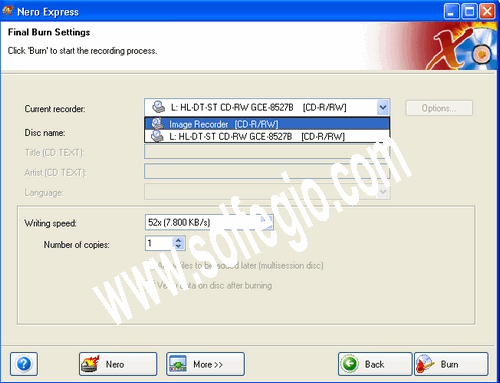

Nanti kita akan disuguhkan penentuan lokasi penyimpanan file image tersebut.
2. Setelah file imagenya jadi, buka software VCD PROTECTOR.


Browse/cari file image tadi, dan klik START. tunggu sampai ada notifikasi bahwa proses berhasil.


4. Buka Nero kembali, dan gunakan pilihan BURN IMAGE TO DISC. lalu masukan file image tadi ke Nero, atur speed sesuai selera dan BURN :D


BELI DVD Writable Drive disini:

- LG Electronics GH22NS50 22X SATA Super Multi DVD+/-RW Internal Drive - Bulk with Software (Black)
- Sony 24X SATA Internal DVD+/-RW Drive AD-7260S-0B - Bulk (Black)
- USB 2.0 Slim External DVD ROM CD-RW Combo Drive Writer
- Lite-On LightScribe 24X SATA DVD+/-RW Dual Layer Drive IHAS424-98 - Retail (Black)
- Asus 24x DVD±RW Drive DVD-RAM/±R/±RW 24x 8x 16x (DVD) 48x 32x 48x (CD) Serial ATA Internal OEM DRW-24B1ST (Black)
- Samsung Blu-Ray Combo Internal 12X Readable and DVD-Writable Drive with Lightscribe SH-B123L/BSBP

 Setelah burn-nya berhasil, ya test aja :D
buka di PC, liat di explorer, apakah CDnya kebaca??? apa jadi kosong?? trus test lagi putar cdnya di VCD Player :D
Ini hanya perlu bantuan aplikasi ringan protector vcd itu aja, trus dimana dapatin softwarenya???????? Silahkan download DISINI !

Artikel ini dari blog teman kita, bertandanglah kesana :

Intip Terus Sampai Selesai...

Saturday, July 23, 2011

Multimedia : Free Download Software Nero - 9.4.13.2 Full Version

Download Program Nero 9.4.13.2 Free Full Vversion - Nero 9 merupakan aplikasi multimedia yang bisa digunakan untuk merekam konten ke CD dan DVD blank dari berbagai format termasuk Blu-ray dan HD DVD, Selain bisa membakar CD dan DVD, Nero 9 ini juga bisa anda gunakan untuk share dan upload secara online. Nero 9 adalah fleksibel, dapat diandalkan, dan aplikasi yang mudah digunakan yang dirancang untuk menulis data dan audio CD ke CD-R dan cakram CD-RW. ISO 9660 ini mendukung gambar serta modus ISO 1 dan modus XA 2, dan memungkinkan untuk merekam disk on-the-fly selain overburning (jika didukung oleh perangkat keras). Ini juga mendukung multisession dan rekaman modus campuran, HFS, ISO / HFS hibrida, UDF, PSX, OFAS (file kecepatan akses yang optimal), track-at-sekali (TAO) dan cakram at-sekali (DAO) menulis, digital audio ekstraksi, dan banyak lagi.

Selain itu, Nero dapat dinamis menonaktifkan otomatis-memasukkan pemberitahuan, menawarkan dukungan untuk beberapa bahasa, dan bekerja dengan semua model utama CD-R dan CD-RW drive. Ini juga berisi standalone Cover Editor untuk merancang dan mencetak CD penutup.

Cepat dan mudah merobek, membakar, Autobackup, dan fungsi salin


Beli Software Nero Terbaru Disini :
- Buy Nero Essentials Nero Suite 3 Ver. 9.4 OEM Bundle Solution With DVD Playback BareNew
- Buy Nero Multimedia Suite 10
- Buy Nero 10 Multimedia Suite Platinum HD
- Buy Nero Video Premium HD
- Buy Nero 10 Multimedia Suite Platinum HD RBT
- Buy Nero PhotoShow Deluxe 4


Backup file ke CD, DVD, dan Disc Blu-ray *

Buat profesional-cari film DVD dengan menu 3D terpadu

Menyalin, membakar, saham, upload, dan membuat musik campuran seperti DJ

Mengkonversi musik, foto, dan DVD untuk bermain di iPod ® Anda dan perangkat mobile lainnya

Cepat upload foto dan video ke My Nero dan komunitas online lainnya .**

Watch, record, pause, dan live TV menyesuaikan pengalaman Anda

Play AVCHD dan lainnya format HD

Arsip HD film dalam kualitas tertinggi AVCHD format HDD termasuk: USB flash stick dan kartu memori, SD Card dan Sony Memory Stick ®. bahkan tanpa penggunaan sebuah BARU perekam optik!

Jika teman-teman berminat ingin dan mau mendownload Nero 9.4.13.2 , silahkan klik link download dibawah ini, karena program ini juga sudah saya lengkapi dengan serial keygen nya. Jadi, teman-teman sudah bisa menggunakan Nero-9.4.13.2 ini secara Full Version dan Gratis

Download : Program Nero-9.4.13.2
Download : Serial keygen Nero-9.4.13.2

sumber :
http://www.alastengah.tk/2010/05/free-download-nero-9.html?showComment=1311400372958#c4744449343619917135

Intip Terus Sampai Selesai...

Wednesday, February 9, 2011

Sony Vegas Pro 10 Advanced Editing Software Review

BUY THIS SOFTWARE HERE:
- Buy Sony Vegas Movie Studio HD Platinum 10
- Buy Sony Creative Software Movie Studio HD Platinum 11
- Buy Sony Vegas Movie Studio 9 Platinum Pro Pack
- Buy Sony Creative Software Movie Studio HD Platinum Suite 11 V.11
- Buy Sony Movie Studio HD
- Buy Sony Creative Software Movie Studio HD Platinum Suite 11 V.11
- Buy ACID Pro 7

Sony Vegas Pro 10 is a powerful editing program and a worthy contender with enough features and control to suit any professional, but easy enough for beginners as well.
 
With the video industry evolving at breakneck speeds, Sony has worked to stay competitive in every category. The media giant's video editing software, Vegas Pro, has always been slightly overshadowed by its aggressive competitors (Adobe Premiere, Avid Media Composer, Final Cut Pro) but with each new release, Sony manages to prove that Vegas Pro is not only a worthy competitor, but is in fact an editing suite that deserves some attention from both beginners and professionals.

The Test Drive

Now I have to admit that as I opened the program on my Intel Core i7 950 system, I couldn't help but be just a little skeptical. After all, I was a little less than satisfied with the Sony Vegas Pro 9 release. My doubts slowly dissipated as I loaded in the footage from a Canon 5D Mark II. I instantly noticed a huge improvement in performance from the previous release thanks to Sony's added support of GPU accelerated AVC/H.264 decoding. As with a growing number of other video producers, I am primarily an HDLSR shooter so having an editing suite capable of handling the .mov files natively is very important to me. Not only was I able to easily import all 35 minutes of my 1920x1080 HD footage (previous versions had trouble loading more than 10-12 minutes) but I was able to easily edit the footage while smooth real time previews were delivered at a much higher quality than before.
As I edited my project and worked through the whole program I was reminded of how quickly and easily you can move around. What sets Vegas apart from its competitors is the convenience. Everything you need is available with the click of the mouse. Complex functions in other programs such as speed ramping, are incredibly simple. The interface looks and feels pretty much the same as previous versions but there is one change I instantly noticed. Sony added the ability to apply audio effects to individual audio clips, (a long overdue feature), whereas before effects could only be applied to the whole track. This makes editing audio much easier. I also noticed the addition of VU meters on the audio tracks which allows you to visually monitor audio levels on the individual tracks.

The Upgrades

Of the new features packed into Sony Vegas Pro 10, my favorite by far is the image stabilization feature. What used to take the use of tracking motion in After Effects can now be done right in Vegas. The "Stabilize Media" interface is intuitive and comes with several different profiles to choose from including "handheld smooth" which makes handheld dolly shots look like they were actually shot with a dolly. Depending on how shaky the footage is, the image is cropped in to allow for movement of the frame. But overall a small price to pay for an amazing feature.
The color correction features have also been improved, which is something that I always felt was lacking with previous versions. Sony has also added a white balance adjustment to the collection of effects. It's not perfect but it definitely makes warming or cooling your image quicker.

Edit 3D - Truly

One of the biggest features is the ability to edit stereoscopic 3D footage. That's right! You can make your own 3D movie. Assuming of course you have the right equipment to actually film 3D footage. I've seen some pretty impressive dual camera setups and Sony has a 3D camera right around the corner. I didn't have any 3D footage to work with but looking at the interface, it is a very powerful tool as well as a very forward thinking move on Sony's part. 3D video for consumers is on the horizon - ready or not!

Conclusion

Overall, Sony has made a great improvement in file handling performance as well as adding some very nice features that I am quickly learning to rely on. The interface is intuitive and very easy to move around in which is a reputation Sony Vegas has become known for. The ProType Titler is a little confusing at first but does work well once you get the hang of it. I would love to see the ability to change the video layer properties (i.e. hard light, overlay, etc.) on a clip level similar to the way Adobe Premiere handles it. Currently layer properties have to be changed to the entire track which makes adding overlay effects tricky.

Intip Terus Sampai Selesai...